


Selling online has become one of the fastest ways to grow your business in India, and Flipkart is one of the leading e-commerce platforms for sellers of all sizes. Whether you are a small entrepreneur, a brand owner, or a large business, Flipkart offers a simple, structured, and profitable way to reach millions of customers nationwide. With the right guidance, onboarding on Flipkart can be smooth, allowing you to list your products, manage orders efficiently, and grow your sales.
In this guide, we will walk you through the complete step-by-step process to onboard on Flipkart successfully, along with expert tips to boost your performance.
Step 1: Decide Your Business Type
Before registering on Flipkart, determine your business type
- Individual/Sole Proprietor – Best for small businesses or personal sellers.
- Partnership/Company – Ideal for larger businesses or registered brands.
Note: GST registration is mandatory if your turnover exceeds ₹40 lakh annually (₹20 lakh in some states).
Step 2: Sign Up on Flipkart Seller Hub
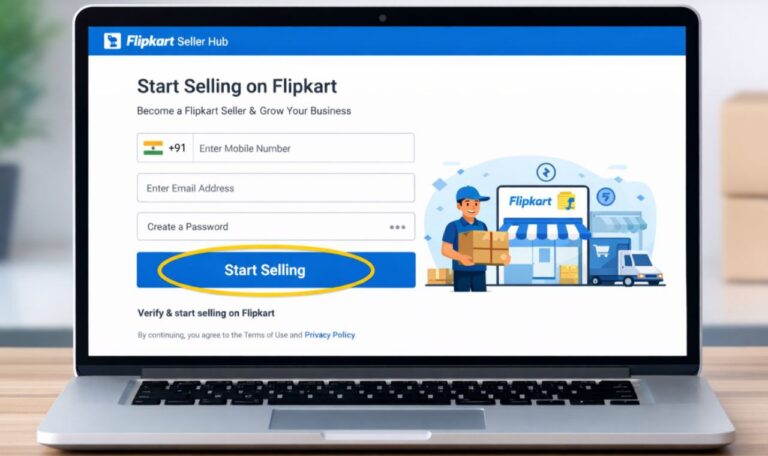
- Visit Flipkart Seller Hub.
- Click “Start Selling”.
- Enter your mobile number and verify it with OTP.
- Provide email ID, business name, and create a password.
- You now have a Flipkart Seller account.
Step 3: Complete KYC Verification
Flipkart requires documents for Know Your Customer (KYC) verification. Upload the following:
1. Business Details
- PAN card (personal or business)
- GST certificate (if applicable)
- Business address
- 2.Bank Account Details
- Cancelled cheque or bank statement (account must match PAN holder)
3.Identity Proof
- Aadhaar card / PAN card / Passport
Flipkart usually verifies KYC within 24–48 hours.
Step 4: Set Up Your Seller Profile
After KYC approval:
- Add logo, brand name, and business description.
- Specify return policies and shipping preferences.
- Make your store professional and trustworthy, as this attracts more buyers.
Step 5: Add Products
Product listings are crucial for visibility. Steps include:
1.Go to “Add Products” in Seller Hub.
2.Fill in product details:
- Title – Include brand and main keywords
- Category & subcategory – Accurate classification
- Description & features – Highlight key selling points
- Price & stock quantity
3.Upload high-quality images:
- White background recommended
- Multiple angles and product dimensions
Tip: Complete product listings with all attributes improve visibility in search results.
Step 6: Choose Logistics & Shipping
Flipkart gives two options:
1.Flipkart Advantage / F-Assured Logistics
- Flipkart handles shipping, returns, and tracking
- Faster delivery → better customer trust
2.Self-Managed Shipping
- You handle packing, courier, and delivery
- Only choose if you have reliable logistics
Set processing time, shipping charges, and return period carefully.
Step 7: Manage Orders
Once products are live:
- Log in to Seller Hub → Orders
- Accept incoming orders
- Pack & ship on time
- Upload tracking details (if self-shipping)
Tip: Timely shipment improves seller rating. Late shipments reduce visibility.
Step 8: Marketing & Promotions
- Use Flipkart Ads to boost product visibility.
- Participate in sale campaigns like Flipkart Big Billion Day.
- Offer discounts, combo deals, and bundle offers to attract buyers.
Step 9: Track Performance
- Seller Hub provides analytics for:
- Sales trends
- Inventory status
- Customer ratings & reviews
- Regularly monitor performance and optimize listings for better sales.
Pro Tips for Success
- Use high-quality images and accurate product titles.
- Write clear, keyword-rich descriptions.
- Maintain good seller rating by shipping on time.
- Keep stock updated to avoid cancellations.
- Respond quickly to customer queries to build trust.
Conclusion
Onboarding on Flipkart opens doors to a massive customer base and tremendous growth opportunities. By completing KYC, adding high-quality products, managing logistics efficiently, and using promotions wisely, you can build a successful online store. Attention to detail, professional listings, and timely order management are key to establishing credibility and boosting sales. With persistence, strategy, and smart execution, Flipkart can become a powerful platform to scale your business and achieve long-term success.
